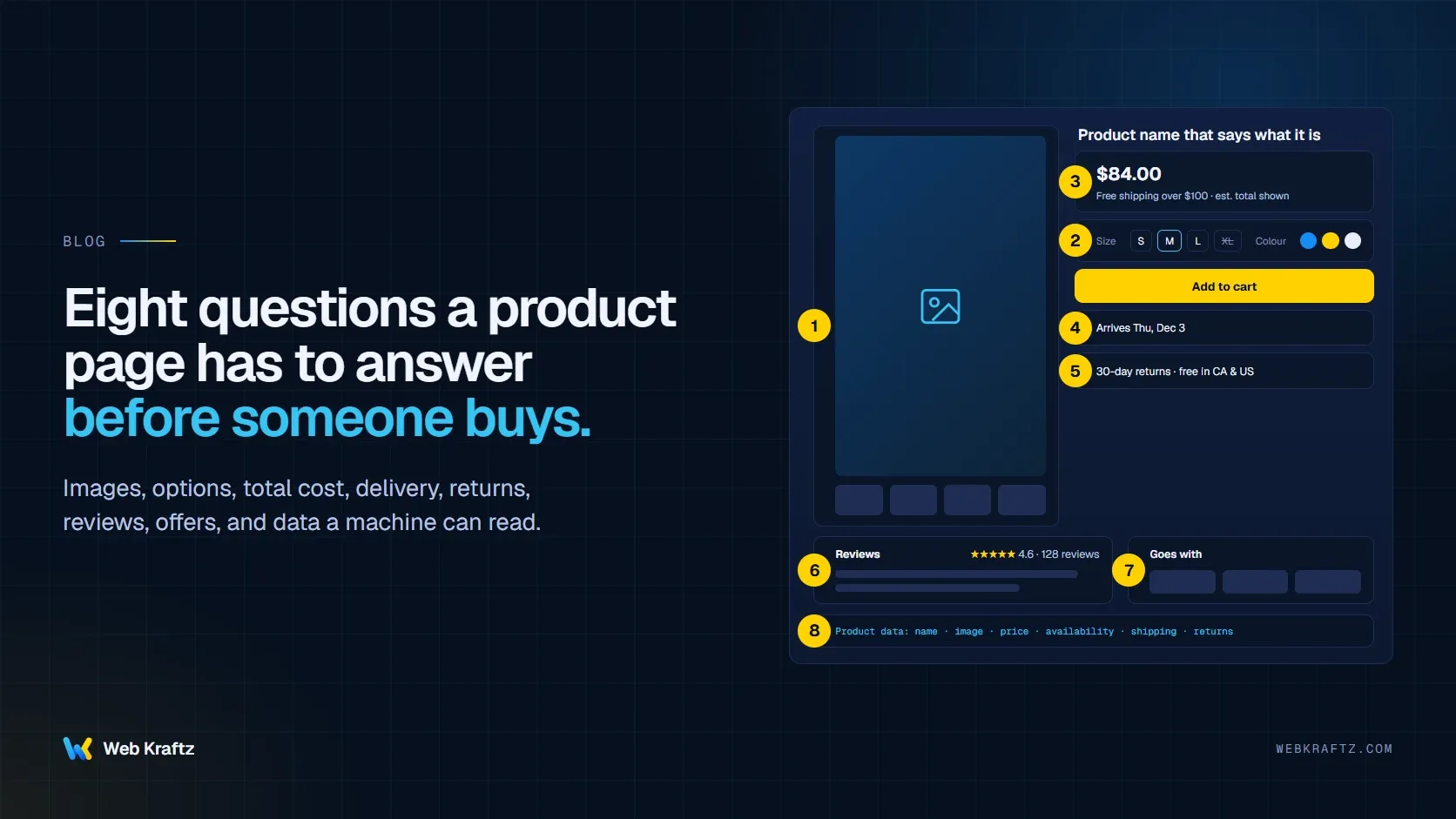
Baymard Institute benchmarks the product pages of 344 leading US and European stores, and its current finding is that only 49% of them reach a decent or good standard. The other 51% are mediocre or worse. These are large retailers with design teams. The gap is not taste. It is that the page leaves questions unanswered, and a shopper who has to go looking for an answer often does not come back.
Nielsen Norman Group puts it in one sentence: shoppers look to the product page to answer all their product questions. So this post is organised as the eight questions, in the order a buyer asks them, with what the research says and where the setting lives on Shopify. Use it to audit one of your own pages.

1. What exactly is this?
The name should say what the thing is without the brand's internal vocabulary, and the images do most of the remaining work. In Baymard's testing, 56% of users' first action on a product page was to explore the images (that study is from 2020, and nothing since suggests people look at pictures less). Two specific gaps from its latest review of product pages: 42% of users try to judge a product's size from its images, yet 37% of sites provide no image showing the product in scale, and 23% provide no image of it on or with a person.
- One image showing scale: in a hand, on a body, next to a familiar object.
- One image in use, and one of the detail people ask about (the clasp, the sole, the port, the label).
- Zoom that works on a phone with a pinch.
- Shopify gives you room: up to 250 media items per product, images up to 5000 × 5000 px and 20 MB, video up to 10 minutes, and 3D models in GLB or USDZ (media types). Write alt text for every image; it is required for accessibility and it is what a search engine reads.
2. Which one do I choose?
Options are where people stall. Baymard's finding is specific: sizes should be buttons, not a dropdown, and 57% of sites still use something else. Buttons show every size and which ones are sold out without a tap.
- Colour swatches on Shopify come from category metafields: connect the colour option to colour entries, and a theme that supports swatches shows them in the variant picker.
- A product can now have up to 2,048 variants and 3 options. That is a limit, not a goal. If a page offers hundreds of combinations, ask whether it should be two products.
- Show sold-out variants as sold out rather than hiding them, so the buyer knows the size exists.
- If you sell the same thing in different quantities or sizes, show the price per unit. 81% of sites don't.
3. What will it cost me, in total?
This is the most expensive question to leave open. In Baymard's abandonment survey, among shoppers who were not simply browsing, 40% abandoned a cart because extra costs (shipping, tax, fees) were too high, the largest single reason, and another 12% because they could not see the total order cost up front.

- State the shipping cost or the free-shipping threshold next to the buy button. 67% of sites give no estimate of the total order cost near it. In an older Baymard test, 64% of participants looked for shipping costs on the product page before deciding to add to cart.
- Show the real price. In Canada, advertising a price and adding mandatory fees later is drip pricing, which the Competition Bureau treats as a concern under the Competition Act unless the added charge is imposed by government, such as sales tax.
- If you offer instalments, say so by the price. Shop Pay Installments is available to eligible stores in the United States, Canada and the United Kingdom, and in early access in Australia.
4. When will I get it?
“Delivery was too slow” is the second reason on Baymard's list, at 20%. Often the delivery was fine and the page simply never said. A date beats a range, and a range beats nothing.
- Shopify's automated delivery dates predict specific dates from your own shipping performance. They are available for Australia, Canada, New Zealand, the United States and select European countries.
- During the holidays, add the last order date for delivery before December 25, and remove it the day it passes.
- If an item is on backorder or made to order, say so on the page, not in the confirmation email.
5. Can I send it back?
13% of abandoners in the same Baymard survey left because the returns policy was not satisfactory, and 44% of sites neither display nor link to the policy from the main product page content. In the NRF and Happy Returns 2025 report, 82% of consumers called free returns an important consideration when shopping online, and retailers expected 19.3% of online sales to be returned.
You do not need the whole policy on the page. You need one line near the buy button with the window and who pays, linked to the full text: “30-day returns. Free in Canada and the US.”
6. Can I trust it?
Reviews answer this better than any badge. Northwestern's Spiegel Research Center found that a product with five reviews is 270% more likely to be purchased than one with none, and that purchase likelihood peaks at an average rating between 4.0 and 4.7, not at a perfect 5. A page of flawless scores reads as curated.
- Let shoppers browse photos submitted by reviewers. 63% of sites don't.
- Reply to negative reviews. 89% of sites don't, and the reply is read by every later shopper.
- Keep them honest, because it is now enforceable. The FTC's rule on consumer reviews, in effect since October 21, 2024, bans fake reviews, undisclosed insider reviews and incentives tied to a positive rating. You may still offer an incentive for a review, as long as there is no requirement about what the review says.
- Google added a guideline to its review snippet documentation in July 2026: no fake or undisclosed incentivised reviews on the page or in its markup, and reviews must be visible to users on the page they are marked up on.
7. Is there a better deal here?
An offer belongs on the product page only if the buyer can understand it in one read and it does not hide the main button. One primary action, one offer.
- Bundles. Shopify Bundles is Shopify's free app for fixed bundles and multipacks, with up to 30 components per bundle. A bundle works when the items are used together, not when it clears slow stock.
- Goes-with products. The Search & Discovery app lets you set complementary products by hand: between 1 and 10 per product, in one block on the page. Pick the two or three a customer really needs (the charger, the refill, the case).
- A sale price you can defend. The crossed-out price has to be one you really charged. We covered the US, Canadian and EU rules in our October checklist.
- A threshold. “Add $18 for free shipping” next to the button answers question 3 and raises the order value at the same time.
8. Can a machine read all of this?
Search engines and AI shopping assistants now read your product page before many of your customers do, and they read data, not layout.
- For Google's merchant listings, the required product properties are name, image and offers, with a price and currency. Recommended ones include availability, shipping details and a return policy. Google recommends stating the return policy once at the organisation level, and since November 2025 it supports a store-wide shipping policy the same way.
- On Shopify, the theme's structured_data filter outputs a Product, or a ProductGroup when the product has variants. Check that an app has not added a second, conflicting copy.
- For AI channels, Shopify lists products by default with their title, description, options, images, price and availability, and says the details AI platforms consider include the title, description, images, type, vendor, collections, tags, barcode and variant option names. A variant called “Option 2” helps nobody.
- Google removed FAQ rich results from its documentation in June 2026. Keep product questions and answers on the page for buyers, not for a search feature.
More on that in our guide to AI-ready Shopify catalogs and how to check what AI assistants say about your store.
And it has to work on a phone, for everyone
- Google's Core Web Vitals thresholds, measured at the 75th percentile of real visits: the main content loads within 2.5 seconds, the page responds to a tap within 200 milliseconds, and layout shift stays at 0.1 or less. The usual culprits on a product page are an oversized first image and review or upsell apps that load before the buy button.
- WCAG 2.2 asks for tap targets of at least 24 by 24 CSS pixels, which small colour swatches often miss, and for text contrast of at least 4.5:1, which grey sale-price and “sold out” labels often miss.
Audit one page in twenty minutes
- Open your best-selling product on your own phone, on mobile data, not office Wi-Fi.
- Without scrolling past the buy button, can you tell the total cost, the delivery date and the returns window? Write down which are missing.
- Pick a size and colour. Is it obvious what is sold out?
- Find a negative review. Has anyone answered it?
- Run the page through Google's Rich Results Test and read what it finds for price, availability, shipping and returns.
- Ask an AI assistant about the product by name and compare its answer with your page.
Most stores find three or four gaps, and most of the fixes are content and settings, not a rebuild. If you would like us to run this audit on your store, it is part of how we start Shopify Plus projects and monthly website management. Book a free consultation.